
.png)
Description
Download Sticker Prompt Generator – AI‑Powered Art Styles, Free & Secure
Looking for a fast, reliable way to generate dozens of eye‑catching sticker designs without learning complex software? The Sticker Prompt Generator delivers exactly that – a cloud‑based, AI‑driven engine that turns a simple text prompt into ten distinct visual styles in seconds. Whether you’re a freelance illustrator, a brand manager, or a hobbyist who loves creating emojis for chat apps, this tool removes the bottleneck of manual style selection and lets you focus on the concepts that matter most. Below you’ll find a detailed review that covers every aspect of the app, from core features and cross‑platform compatibility to real‑world usage tips and frequently asked questions. By the end, you’ll know exactly why this free web app deserves a spot in your creative toolbox.
Overview
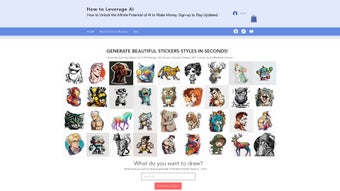
The Sticker Prompt Generator, built by the AI‑focused team at How to Leverage AI, is a browser‑based creative assistant designed specifically for sticker, emoji, NFT, and graphic designers. Its primary promise is simple: type a short description—such as “a cheerful cactus wearing sunglasses”—and receive ten completely different art‑style renditions instantly. Because the computation happens on secure cloud servers, you never need to download bulky model files or worry about hardware limitations. The interface is intentionally minimalist: a single input field, a “Generate Styles” button, and a thumbnail gallery that updates in real time. The tool also integrates a learning hub packed with short video tutorials, style‑selection guides, and a monetisation roadmap that explains how to turn your generated assets into revenue on platforms like Etsy, Redbubble, and OpenSea. Regular back‑end updates keep the AI models aligned with the latest design trends, ensuring that you always have access to fresh, contemporary aesthetics. Security is baked in; all data transfers use HTTPS, prompts are encrypted during processing, and no personal information is stored beyond the short window needed to render the images. In short, the Sticker Prompt Generator offers a frictionless, free, and secure pathway from idea to polished visual asset.
From a usability perspective, the app shines because it eliminates the typical back‑and‑forth that designers face when choosing colors, line weights, or shading techniques. Instead of manually tweaking each parameter, the AI interprets your textual cue and produces a diversified set of styles ranging from flat vector‑friendly icons to richly textured digital paintings. This breadth of output is particularly valuable for creators who need to test multiple branding directions quickly. Moreover, the free tier imposes no hard limits on the number of prompts you can submit, making it an attractive option for small studios or solo entrepreneurs operating on a tight budget. While premium add‑ons exist for batch processing and ultra‑high‑resolution exports, the core experience remains completely free and fully functional. Overall, the overview paints a picture of a tool that is both technically sophisticated and remarkably approachable, catering to a wide audience without sacrificing depth or quality.
Key Features That Power Your Sticker Design Workflow
- One‑click generation of 10 unique AI art styles per prompt.
- Fully web‑based – runs on Windows, macOS, Linux, ChromeOS, Android, and iOS.
- Supports stickers, emojis, NFTs, comic panels, t‑shirt prints, and social‑media graphics.
- Integrated learning hub with step‑by‑step tutorials on character creation and brand‑consistent palettes.
- Monetisation guide covering pricing strategies, marketplace selection, and copyright basics.
- Secure cloud processing with HTTPS encryption and temporary data retention.
- Automatic AI model updates to keep style libraries current with design trends.
- Export options in PNG, JPEG, and SVG for raster or vector workflows.
- Responsive UI that adapts to desktop, tablet, and mobile screens.
- Free tier with unlimited prompts; premium upgrades for batch jobs and higher‑resolution assets.
Beyond the headline feature of instant multi‑style generation, the platform bundles a suite of productivity tools that streamline the entire creative pipeline. The learning hub, for instance, offers short videos on topics like “From Sketch to Sticker” and “Choosing the Right Color Scheme for Brand Cohesion,” which are valuable for both beginners and seasoned designers looking to sharpen their skills. The monetisation guide demystifies the often‑confusing world of online art sales, providing actionable tips on how to price digital assets, protect intellectual property, and market products effectively across multiple channels. Because the service runs entirely in the cloud, you benefit from the latest AI advancements without ever needing to patch or reinstall software—updates happen silently in the background. Privacy is also a priority; prompts are encrypted during transit, processed in a sandboxed environment, and discarded shortly after the image is rendered. Export flexibility means you can download vector files for infinite scaling or raster formats ready for immediate upload to social platforms. Altogether, these features create a comprehensive, all‑in‑one design engine that reduces decision fatigue, accelerates production, and opens new revenue streams for creators of all skill levels.
Installation, Usage Guide & Compatibility
Getting started with the Sticker Prompt Generator is intentionally frictionless. Because the application is 100 % web‑based, there is no traditional installation process. Simply open your preferred modern browser—Chrome, Firefox, Edge, or Safari—and navigate to the official URL. On first visit, you’ll be asked to accept a brief privacy notice and enable cookies, which are required for session handling and to store temporary preferences securely. Once you grant permission, the main interface appears: a clean input field labeled “What do you want to draw?” Type a concise description (e.g., “a playful robot holding a balloon”) and click the bright “Generate Styles” button. Within a few seconds, ten thumbnail previews populate the screen, each representing a distinct AI‑generated style. Hovering over a thumbnail enlarges the view, and a single click on the “Download” icon saves the chosen style in PNG, JPEG, or SVG format. If you need a higher resolution, a dropdown menu lets you select sizes ranging from 512 × 512 up to 2048 × 2048 pixels. The entire workflow—from prompt entry to asset download—takes less than a minute, even on average broadband connections.
Compatibility is a core strength of the platform. Since all processing occurs server‑side, the only requirement on the client side is a modern browser that supports WebGL and JavaScript ES6. The official compatibility list includes:
- Windows 10/11 – Chrome, Edge, Firefox
- macOS 10.15+ – Safari, Chrome, Firefox
- Linux (Ubuntu, Fedora, etc.) – Chromium‑based browsers
- ChromeOS devices – Chrome
- Android 8.0+ – Chrome or Firefox mobile
- iOS 13+ – Safari or Chrome
Pros
- Instant, multi‑style output saves hours of manual iteration.
- Completely browser‑based – no heavy downloads or installations.
- Unlimited free prompts make it accessible for any budget.
- Regular AI updates keep the style library fresh and relevant.
- Learning resources and monetisation guide add real educational value.
Cons
- High‑resolution downloads require a premium add‑on.
- Requires an active internet connection; offline use is not possible.
- Some niche artistic styles may need minor post‑generation tweaks.
In practice, the minimal setup time and broad device support outweigh the few limitations. The occasional need for a paid upgrade is a small price to pay for the dramatic increase in creative speed and flexibility that the tool provides.
Frequently Asked Questions & Final Verdict
Is the Sticker Prompt Generator completely free?
Yes, the core functionality—generating ten AI art styles per prompt—is 100 % free. Premium features such as batch processing, ultra‑high‑resolution exports, and priority AI model access are available through optional paid plans.Do I need to create an account to use the tool?
No account is required for the free tier. You can start generating styles instantly. An account is only needed if you subscribe to premium features or wish to save your prompt history.Can I use the generated stickers for commercial projects?
Absolutely. All images generated under the free tier come with a commercial‑use license, allowing you to sell stickers, t‑shirts, NFTs, or any other merchandise without additional royalties.What browsers are recommended for the best experience?
We recommend the latest versions of Chrome, Edge, or Firefox on desktop, and Chrome or Safari on mobile. These browsers fully support the WebGL and AI inference technologies used by the platform.How does the tool protect my privacy and data?
All prompts are transmitted over HTTPS and processed in an encrypted environment. The system does not store your prompts longer than necessary for image generation, and no personally identifiable information is retained without your consent.
Conclusion – Boost Your Creativity Today
The Sticker Prompt Generator stands out as a fast, free, and secure solution for anyone who needs high‑quality, AI‑driven art styles on demand. Its one‑click workflow eliminates the tedious back‑and‑forth of style selection, while the integrated learning hub and monetisation guide turn a simple design tool into a full‑fledged creative business engine. Whether you’re a freelance illustrator, a small‑business owner looking to spice up branding assets, or a hobbyist who loves experimenting with AI, this web app gives you the power to explore, iterate, and profit—all without paying a dime for the core features. Ready to see ten fresh styles appear in seconds? Download the Sticker Prompt Generator now and start turning your ideas into eye‑catching stickers, emojis, and more.
The Sticker Prompt Generator delivers on its promise of instant, diverse AI styles, making it an essential addition to any designer’s toolkit. The free tier is generous, the interface is clean, and the added learning resources provide real value beyond simple image generation. Minor drawbacks like the need for an internet connection are easily outweighed by the time saved and the creative possibilities unlocked.
Guides & Tutorials for Sticker Prompt Generator
How to install Sticker Prompt Generator
- Click the Preview / Download button above.
- Once redirected, accept the terms and click Install.
- Wait for the Sticker Prompt Generator download to finish on your device.
How to use Sticker Prompt Generator
This software is primarily used for its core features described above. Open the app after installation to explore its capabilities.
User Reviews for Sticker Prompt Generator 0
No reviews found




